
Tattoo Studio Pro
Zadie StudioBusiness
3.713.00 Reviews
- Version
- 4.3.16
- Installs
- 10.00K
- Age Rating
- Everyone
Screenshots
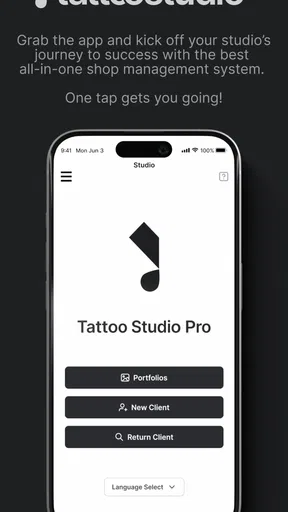
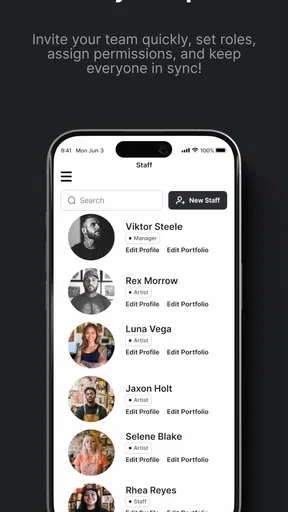
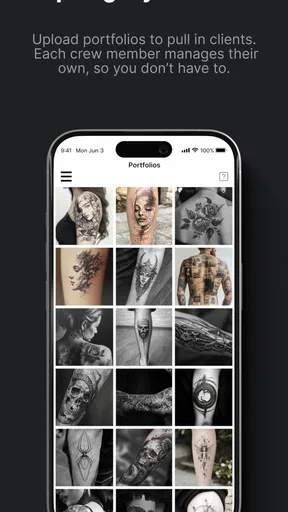
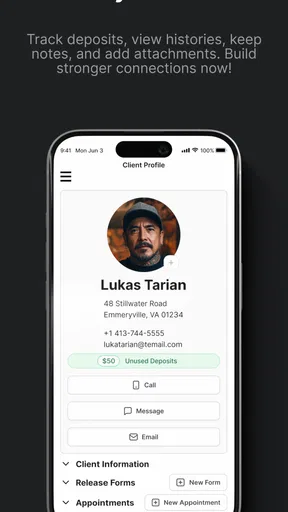
Our Review of Tattoo Studio Pro
 Analysis by Appyee
I approached Tattoo Studio Pro as a working tool rather than a casual business app, and that distinction matters. It is built for tattoo and piercing studios that need a more focused way to organize day-to-day operations, not for someone looking for a general notes app or a simple appointment calendar. My first impression was that its value depends heavily on how clearly a studio has defined its own workflow. If your work revolves around artists, clients, body-art appointments, and the practical details around each visit, a specialized system makes more sense than forcing a generic business app to fit.
The app comes from Zadie Studio and sits in the Business category. It is free to install, rated for Everyone, and supports Android 8.0 or later. That makes it relatively approachable for studios using older Android devices at the front desk or in a back room. It has reached over 10 thousand installs, with an average rating of 3.7 from around 40 ratings and roughly 10 reviews. Those numbers suggest a small but real user base rather than a mainstream platform, so I would treat it as a focused studio tool that deserves a practical trial before a whole team depends on it.
How the current version fits a real studio
The current release is version 4.3.16, and the most useful way to judge it is by the kind of work it is meant to support. Tattoo and piercing businesses have needs that overlap with ordinary appointment-based companies, but they also have their own rhythm. A client may need a consultation before the actual session, an artist may need to prepare around a particular design, and the front desk may need to keep information connected to the right person and visit. A tool designed around body art can reduce the awkwardness of adapting a salon, generic calendar, or basic customer relationship app.
I would place it between a simple scheduling utility and a broader studio-management platform. It is more relevant to a tattoo shop than a generic task list because the product is explicitly aimed at tattoo and piercing studios. At the same time, I would not assume that a specialized label automatically means it replaces every separate system a busy business might use. The best fit is a small or growing studio that wants one central place for its operational routine and is willing to shape its procedures around the app.
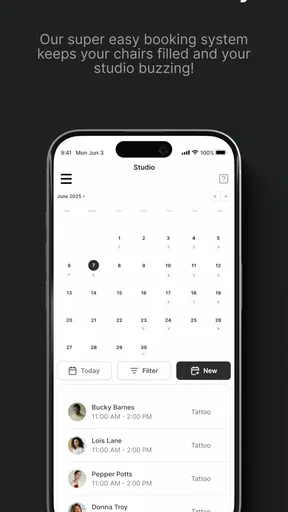
A realistic example is a studio opening for the day with several artists working different hours. The person handling the desk needs to see which visits belong to which artist, understand what needs attention before a client arrives, and avoid relying on scattered messages or handwritten notes. During a quieter moment, the owner may review the day and spot where the schedule is overloaded or where consultations have been placed too close to longer sessions. The benefit is not dramatic automation; it is reducing the number of small decisions that otherwise live in people’s heads.
Where a focused workflow helps
My strongest recommendation is to use the app as the studio’s operational reference point, not merely as another place to copy appointments. When a business keeps client details in one tool, bookings in another, and artist availability in a third, mistakes tend to happen at the boundaries. A dedicated body-art management system can be useful precisely because it encourages the team to think in terms of the full visit rather than just a time slot.
That approach is especially helpful for studios that handle both tattooing and piercing. These services may share a reception area but differ in timing, preparation, and follow-up. Keeping them within a studio-specific workflow can make the day easier to read than a generic calendar filled with vague entries. I would still create clear naming conventions inside the business: identify the artist, service type, consultation status, and any important internal action in a consistent way. Even a good management app becomes confusing when every employee records information differently.
One non-obvious advantage of a specialized system is that it can expose process gaps. If staff repeatedly need to write reminders outside the app, that is a sign that the studio’s workflow is not fully represented. Rather than treating that as a personal failure, I would use the first week as an audit: note which details are entered, which are duplicated elsewhere, and which are forgotten. That exercise tells you whether the app is genuinely centralizing work or simply adding another administrative stop.
What the version number tells existing users
Version 4.3.16 indicates that the product has moved beyond an initial prototype stage, but a version number by itself does not tell me that every studio workflow has been polished. I would read it as a sign that the app has had time to develop, while still judging the current experience by everyday reliability and ease of training. For an existing user, the important question is not whether the number looks mature; it is whether the latest build feels stable during the moments when the front desk is busy.
That matters because business software is judged differently from entertainment apps. A small inconvenience repeated dozens of times becomes a real cost. If entering a booking, finding a client, or correcting a mistake takes too many steps, staff may quietly return to paper notes or personal messaging. I recommend asking one person to test the complete path from a new inquiry to a completed appointment before rolling the app out to everyone. That gives the owner a clearer picture than asking whether the interface looks acceptable in a short demonstration.
For studios already using an earlier release, I would update with a controlled routine. First, choose a quiet period. Then have staff verify their upcoming schedule and confirm that the information they rely on is visible in the current version. Finally, keep the old process available briefly as a fallback while everyone adjusts. This is not because the app is necessarily unreliable; it is because any change to a live booking workflow deserves a little caution.
How I would organize the first week
I would begin with a small pilot rather than importing the entire history of the business immediately. Set up the people who will actually use the system, define how appointments should be named, and run new bookings through it for several working days. This reveals practical friction quickly: whether the receptionist can find information fast, whether artists understand the entries, and whether the owner gets a useful overview at the end of the day.
A second useful step is to separate information that changes often from information that should remain consistent. Artist availability, appointment details, and daily notes are likely to change regularly. Studio rules, service wording, and internal conventions should be agreed on by the team. Keeping those categories mentally separate helps prevent staff from treating every note as equally important. It also makes it easier to identify what needs attention when a booking is edited.
I would also avoid using the app as a dumping ground for every conversation. A management system works best when staff record concise, actionable information. Long informal notes can hide the one detail that matters. For a tattoo or piercing business, the team should decide what must be recorded for a visit and what belongs in another approved channel. That discipline is a concrete way to get more value from the app without pretending that software alone can solve communication problems.
Where it may fall short
The free entry point is attractive, particularly for an independent artist or a small studio watching expenses. However, the presence of in-app purchases ranging from $29 to $999.99 per item means the financial picture can become much more significant depending on what a business needs. I would not make a purchasing decision based only on the word “free.” Before committing, the owner should establish which functions are available without payment and which paid items would be necessary for the whole team. That is especially important when the upper end of the listed purchase range is relevant to a larger operation.
This pricing structure also affects how I would compare it with alternatives. A basic calendar may cost less in the short term and be easier for a solo artist, but it will not necessarily reflect the needs of a tattoo and piercing studio. A general booking service may offer a familiar customer-facing experience, while a broader business platform may provide more reporting or integrations. Tattoo Studio Pro becomes more compelling when its specialized workflow saves enough administrative effort to justify moving away from those familiar choices. If your needs are limited to keeping a few appointments, a general calendar could remain the simpler option.
I would also be cautious about assuming that every member of a team will adopt it equally well. Artists often want to focus on their craft, while reception staff may carry most of the administrative burden. If the app is introduced without a clear agreement about who enters, updates, and checks information, the system can become incomplete. The solution is not to force everyone to use every part of it. Give each role a defined responsibility and keep the shared process small enough that people can follow it during a busy day.
Another limitation is the risk of over-centralization. A studio may be tempted to store every important detail in one place because that feels efficient. I would resist that instinct until the business has reviewed its internal handling of sensitive client information and decided what should be recorded. The app’s purpose is business management for body-art studios, but responsible studio practice still requires careful judgment about access, retention, and staff habits. A neat interface does not remove the need for good procedures.
Who should use it, and who should skip it
I think it is worth trying for a small tattoo shop, a piercing studio, or an independent artist who has outgrown loose notes and a standard calendar. It is also a reasonable candidate for a studio owner who wants a body-art-specific starting point instead of adapting software designed for an unrelated service business. The Everyone age rating and Android 8.0 requirement make it easy to consider for a mixed set of Android devices, although the team should still test those devices in the actual reception environment.
I would skip it if your business already depends on a mature platform that handles bookings, customer communication, reporting, and staff coordination exactly as required. Replacing a reliable system simply because this app is more specialized could create unnecessary disruption. I would also be hesitant if the studio operates across a complicated multi-location structure and needs extensive controls, integrations, or detailed reporting that have not been demonstrated in daily use. In that situation, a larger business platform may be a better foundation, even if it feels less tailored to tattooing.
Solo artists should think about scale. If you only need a private reminder of upcoming sessions, the management overhead may outweigh the benefit. If you are juggling consultations, multiple service types, changing availability, and front-desk coordination, the calculation changes. The app has a clearer purpose when several moving parts need to stay aligned, not when one person can remember the entire schedule without effort.
Questions I would settle before relying on it
The first question is whether the free version covers the workflow you actually intend to use. I would answer that by setting up a representative week rather than reading feature names in isolation. Include different artists, tattoo and piercing appointments, changes to the schedule, and the kind of notes staff genuinely need. If the process feels natural without paid additions, the app may be a practical low-risk starting point. If essential steps immediately lead toward purchases, calculate the total cost before training the team.
The second question is whether it works for a shared studio or only for one person’s routine. Test it with the receptionist and at least one artist. Have one person create or adjust an entry and another person find and interpret it. This catches unclear labels and handoff problems that remain invisible when the same person performs every action. For a studio, shared understanding is more important than an attractive individual setup.
The third question is how much it can replace. My answer is to replace scattered operational notes first, not every business tool at once. Keep the rollout focused on scheduling and the studio’s immediate management process, then evaluate what still requires another system. This staged approach makes it easier to see the app’s real contribution and prevents the team from blaming it for responsibilities it was never intended to cover.
The fourth question is whether the product is still worth watching as it evolves. I think it is, particularly because version 4.3.16 shows an established line of development rather than a brand-new launch. Existing users should pay attention to whether updates improve speed, reduce repetitive entry, clarify team workflows, and make paid options easier to understand. New users should look for the same evidence during a trial. Those are more meaningful signals than a version number alone.
My final view is positive but measured. This free Business app has a clear audience, and its focus on tattoo and piercing studios gives it a better starting point than generic scheduling software for many body-art businesses. I like the idea of using it to bring artist coordination, client visits, and daily studio administration into a more coherent routine. Still, the average rating of 3.7 suggests that the experience may not satisfy every user, and the broad in-app purchase range makes careful evaluation essential.
I would recommend installing it for a short, realistic pilot and judging it with the whole team, not just the owner. If it reduces duplicated notes and makes the day easier to coordinate, it can earn a place in a small studio’s workflow. If it introduces more steps than it removes, return to the simpler tool that staff will actually maintain. The right test is not whether the app looks specialized; it is whether your studio becomes calmer and more consistent when the doors open.
Verdict
Strengths of Tattoo Studio Pro
- Wide range of tattoo designs and styles to explore
- Useful tools for planning a tattoo concept before visiting an artist
- Simple interface that is easy for beginners to navigate
- Helps compare placement ideas and visualise different compositions
- Can inspire custom designs through creative editing options
Limitations of Tattoo Studio Pro
- Some advanced features may require a paid upgrade
- Design previews may not accurately reflect real tattoo results
- Limited value for users seeking professional tattooing services
- Large image assets can consume storage and mobile data
- Results depend heavily on the quality of the chosen design
Similar Picks in This Category
View All
LinkedIn: Community & Network
LinkedIn3.8

Zoom Workplace
zoom.com4.1

Microsoft Teams
Microsoft Corporation4.6

Meta Business Suite
Meta Platforms, Inc.4.6

Webex Meetings
Cisco Systems, Inc.4.5

TeamViewer Remote Control
TeamViewer4.4
Frequently Asked Questions
What is Tattoo Studio Pro and what can I do with it?
Tattoo Studio Pro is a mobile design app focused on helping users visualize and plan tattoo ideas before visiting a professional artist. After testing its main tools, the app is most useful for experimenting with tattoo styles, placements, sizes, and compositions. You can create or adjust concepts, preview how a design may look, and use the result as a reference when discussing your idea with a tattoo artist.
Is Tattoo Studio Pro suitable for beginners without design experience?
Yes, Tattoo Studio Pro is generally approachable for beginners because it is designed around visual experimentation rather than advanced professional design knowledge. The interface lets you try different ideas and make basic adjustments without requiring drawing experience. However, users should remember that a digital preview is only a concept. A qualified tattoo artist should refine the artwork, check its technical suitability, and adapt it to the body area selected.
Can I preview a tattoo design on my body before getting tattooed?
The app’s preview features can help you understand how a tattoo concept might look in a selected position, which is useful for comparing size, orientation, and overall appearance. The result should not be treated as an exact prediction of the finished tattoo, since skin texture, body movement, lighting, and the artist’s technique can change the final outcome. Always confirm the placement with your tattoo artist.
Does Tattoo Studio Pro create professional tattoo-ready artwork?
Tattoo Studio Pro can be helpful for developing an idea, but it should not replace a professional tattoo artist or illustrator. The app may assist with arranging visual elements and producing a reference image, yet a tattoo-ready design requires appropriate line weight, shading, scale, stencil preparation, and consideration of how the artwork will age on skin. Share your concept with an experienced artist for final preparation.
Is Tattoo Studio Pro free to download, and are there in-app purchases?
Availability, pricing, and included features may vary depending on the Android or iOS version and the developer’s current store listing. Before downloading, check the official app page for information about advertisements, subscriptions, locked tools, and optional purchases. Reviewing those details is especially important if you only need basic previews. Also verify the required permissions and privacy information before granting access to photos or other device content.
